Assignment 4
Goals
Learn to create geospatial and treemap visualizations and apply colormaps.
Instructions
There are three parts to the assignment. You may complete the assignment in a single HTML file or use multiple files (e.g. one for CSS, one for HTML, and one for JavaScript). You should use D3 v7 and Observable Plot for this assignment as directed (Part 1 using D3, Parts 2&3 using either or both). All visualization should be done using D3 calls except where instructed otherwise. You may use other libraries, but you must credit them in the HTML file you turn in. Extensive documentation for D3 is available, and Vadim Ogievetsky’s example-based introduction that we went through in class is also a useful reference. The D3 and Observable Plot Map Examples may also help. Finally, the courselet on color in data visualization should help you understand the details of colormapping as implemented with Plot.
Due Date
The assignment is due at 11:59pm on Friday, April 3.
Submission
You should submit any files required for this assignment on Blackboard. For Observable, do
not publish your notebook; instead, (1) share it with me
(@dakoop) and (2) use the “Export -> Download Code”
option and turn in that file renamed to a4.tar.gz (or
a4.tgz) file to Blackboard. Please do both of these steps
as (1) is easier for me to grade, but (2) makes it possible to persist
the state of the submission. If you complete the assignment outside of
Observable, you may complete the assignment in a single HTML file or use
multiple files (e.g. one for HTML and one for CSS). Note that the files
should be linked to the main HTML document accordingly in a
relative manner (styles.css
not
C:\My Documents\Jane\NIU\CSCI627\assignment4\styles.css).
If you submit multiple files, you may need to zip them in order for
Blackboard to accept the submission.
Details
In this assignment, we will examine information about energy in the United States. This data comes from the U.S. Energy Information Administration and its State Energy Data System estimates. Specifically, we are interested in how electricity is generated in different states and its use in different sectors. We are using the 2024P (preliminary) dataset. I have extracted and filtered the data. To create maps, we will use data with the outlines of each state. This file is in a GeoJSON format that D3 and Observable Plot can handle. In addition, the boundaries have been simplified. The goal of the assignment is to understand energy production and use across the United States.
Data Links
- US State Boundaries GeoJSON: https://gist.githubusercontent.com/dakoop/771a0c3ca9c75c7c7fdc33b12b578724/raw/025cbd5dd1a263659bfb62594d0fe0463e008283/us-states.geosjson
- US Census Divisions: https://gist.githubusercontent.com/dakoop/771a0c3ca9c75c7c7fdc33b12b578724/raw/025cbd5dd1a263659bfb62594d0fe0463e008283/us-regions.csv
- US Energy Data by State: https://gist.githubusercontent.com/dakoop/771a0c3ca9c75c7c7fdc33b12b578724/raw/025cbd5dd1a263659bfb62594d0fe0463e008283/us-electricity.json
- Full Gist: https://gist.github.com/dakoop/771a0c3ca9c75c7c7fdc33b12b578724
0. Info
Like Assignment 1, make sure your assignment contains the following text:
- Your name
- Your student id
- The course title (“Data Visualization (CSCI 627/490)”), and
- The assignment title (“Assignment 4”)
If you used any additional JavaScript libraries or code references, please append a note to this section indicating their usage to the text above (e.g. “I used the jQuery library to write callback functions.”) Include links to the projects used. You do not need to adhere to any particular style for this text, but I would suggest using headings to separate the sections of the assignment.
1. US Map
Use D3 for this part of the assignment.
1a. Base Map (15 pts)
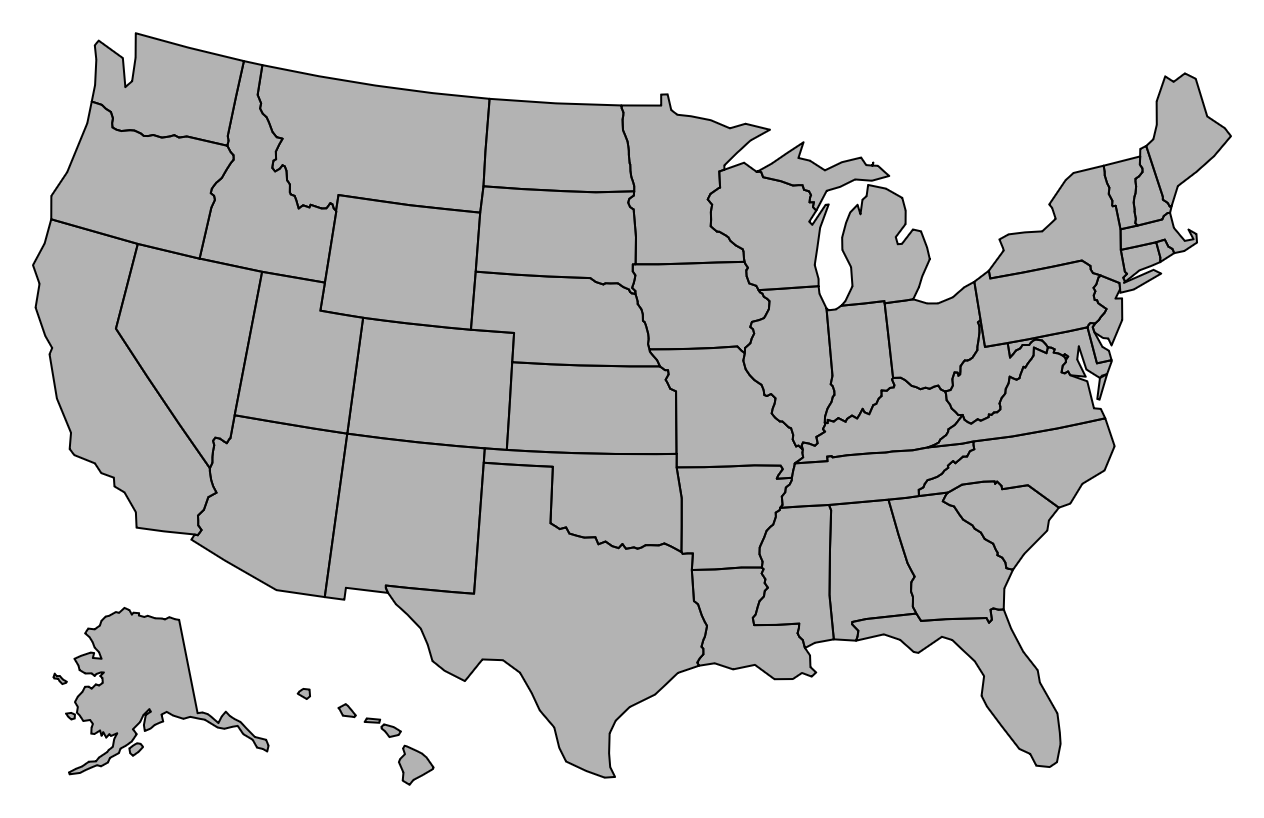
Create a map that shows the US state boundaries. You will only need the GeoJSON data for this part of the assignment. Remember that you will need a projection for the map. For this assignment, we will use the Albers USA projection.
For the map, you will want to use each state as a separate feature.
You can access mapData.features to obtain this array. Each
feature has a number of properties that can be useful for the next
steps. If you wish, you could implement a tooltip using the
STATE_NAME attribute to show a state’s name (for a data
item d, this is stored in
d.properties.STATE_NAME). You can load the mapData via
d3.json.
Hints
- Each state is a feature so if
mapDatais the variable loaded byd3.json,mapData.featuresis a list of all of the states. d3.geoPathcan have an associated projection is used to translate GeoJSON features into paths on screen.
1b. Census Divisions (10 pts)
Create a second US map that colors the states based on the divisions
the census has assigned. In order to color the counties, we want to look
up the division given the county. In the GeoJSON file you used in Part
1a, there is a name property that can be used to match with
the State value in the crop production json file. Given a
GeoJSON feature d, a county’s properties are accessed from
the properties object as d.properties. Thus,
d.properties.name gives the state’s name. It is probably
worth creating a new lookup from the original data in the form of a Map
or an Object that looks something like
{"Vermont": "New England","Virginia": "South Atlantic", ...}
where the keys are the name values, and the values are the
division values. Pick an appropriate colormap for this data. A list of
color schemes is here.
Hints
- Remember the array functions to help build the map between state codes and divisions.
2. Renewable Energy by State
You may use either D3 or Observable Plot (or both) for this part of the assignment. You will create three visualizations with different colormaps.
a. 2023 Nuclear Energy (15 pts)
Using the electricity data in concert with the GeoJSON data, create a new choropleth map that encodes the 2023 nuclear energy generation by state. The colormap should accurately convey the amount for each state. You will be graded on your colormap selection! Create a legend so a viewer can understand the values.
A sample entry of the crop data looks like
[{"StateCode":"AK","Year":1960,"Data":914,"FuelCode":"CL","SectorCode":"EL","Units":"B"},
{"StateCode":"AK","Year":1961,"Data":1127,"FuelCode":"CL","SectorCode":"EL","Units":"B"}
...]
The codes are CL (coal), NG (natural gas), NU (nuclear), RE
(renewables), PA (petroleum). For this part, you will need to use only
the 2023 Nuclear data. As with Part 1, I would suggest writing code to
create a Map
so that given a state abreviation (postal) value, you can
obtain its data.
If we are interested in understanding how much a state leverages nuclear energy, what is a problem with this visualization?
b. 2023 Nuclear Energy Percentage (15 pts)
Create a second choropleth visualization, but this time, show nuclear energy as a percentage of the total energy in 2023. This is calculated by dividing nuclear energy by the total energy. Compute the total energy as the sum of the five sources. This provides a better picture of which states rely more on nuclear energy for electricity generation. You should see that while Illinois is still at the top, New Hampshire also gets more than half its electricity from nuclear. Remember to include a legend.
c. 2000–2023 Difference (15 pts)
Create a third choropleth visualization, but this time, show the percent change in nuclear energy from 2000 to 2023. Here, you should find that some states phased out nuclear energy while in others, nuclear became a larger part of the energy composition. You will need to use a different colormap than in part a. Again, add a legend.
Hints
- Some states do not have any nuclear energy.. How should you
represent them? Think about the colormap you are using. In Plot,
consider the
unknownoption. In D3, check if the value is null before passing it to the scale. - The Map constructor can be created from an iterable of key-value pairs.
- Use Map.get to access a map’s value by key passing the key.
- Color scales for Observable Plot are documented here
- In D3,
d3.scaleSequentialcan help with colormapping. Remember to check the type of the values you are displaying to determine a correct colormap. - To create a good colormap, think about what the domain of the values is.
- To create a nice legend in Observable Plot, use the legend option associated with color. Make sure to label the legend appropriately.
- To create a nice legend in D3, consider using (with proper attribution) M. Bostock’s color ramp approach.
3. [CS 627] Energy Treemap (30 points)
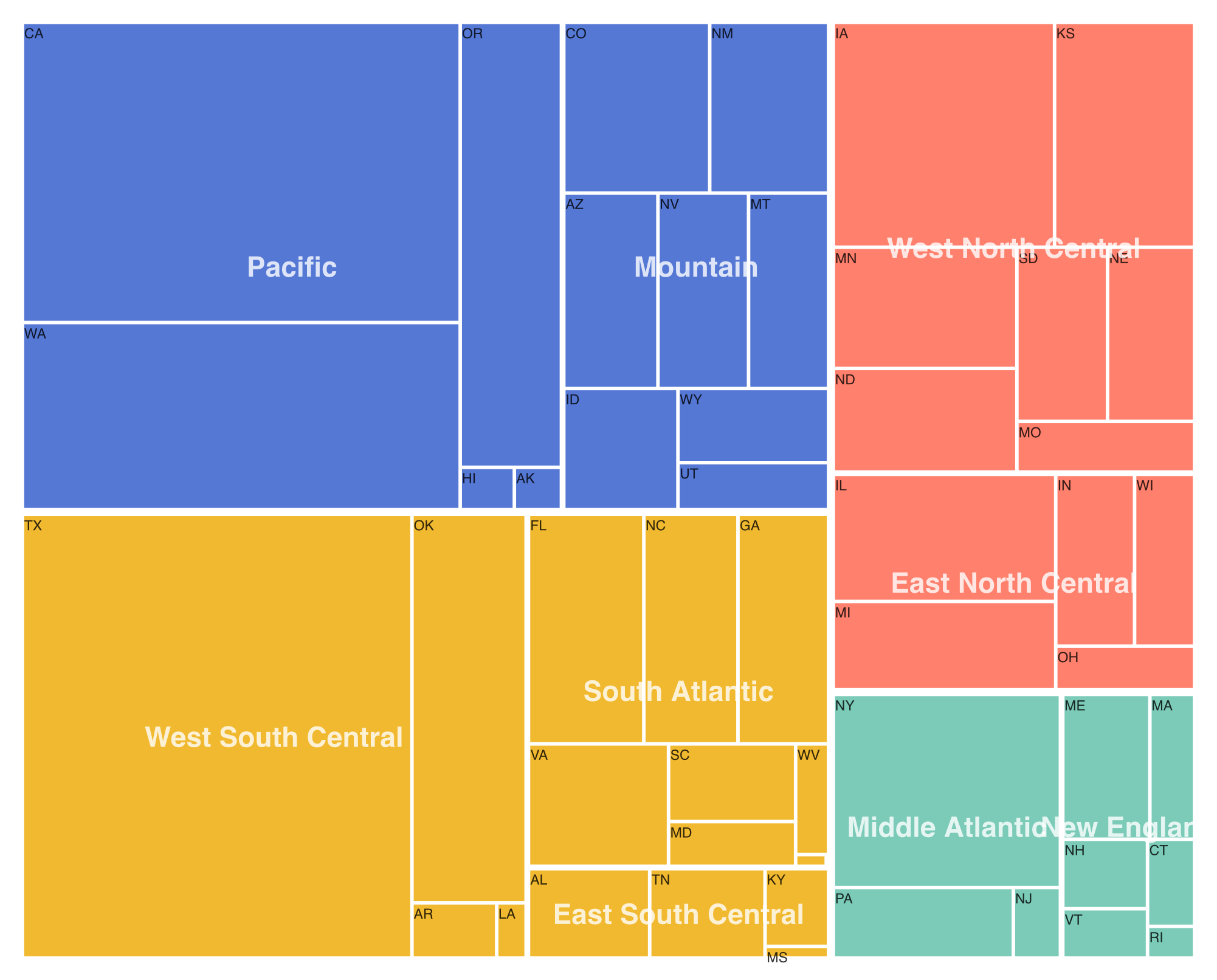
Now, we wish to better understand energy by region, division, and state. To do so, we can create a treemap using the values for one of the energy types (e.g. coal) and the hierarchy region -> division -> state. To help users understand the data, we will label the divisions and states (states using their two-letter abbreviations). You may use D3 or Observable Plot or both for this part. D3 contains the functions to create the hierarchy and treemap.
To create the hierarchy, we can first group the data by region,
division, and state using d3.group. Then, we can pass this
result to d3.hierarchy
to build the tree. Note that maps can be passed directly without
transformation. Make sure to specify which attribute to sum and how to
sort. We can now pass this hierarchy to the d3.treemap layout
function to calculate the rectangles. Use the squarify layout (this is
the default).
From the treemap t, you can extract all leaves via
t.leaves() to draw the visualization. Use the
x0, x1, y0, y1 coordinates to draw each leaf rectangle. The
color should reflect the region. Add a tooltip that shows the region,
division, state, and value, when a state is highlighted. Create a
treemap for the 2023 Renewables (RE).
Hints
- After creating the hierarchy, you can get a node’s parent via the
.parentproperty. All leaves will be at the same depth so you can extract all nodes for divisions via the correct mapping of leaves to parents (or grandparents). - A
Setwill eliminate duplicated nodes (e.g. from divisions) - Make sure your
selectAllstatements do not select already created objects! For example, callingsvg.selectAll(text)twice on the same svg will bind the already created rectangles on the second call. You can attach a class name (text.division) to the object type to avoid this. - Data for a property
fooof a leafdin stored ind.data.foo, but extracting a region/disvision label is atd.data[0]. - Labels can be centered at a particular point by using the
text-anchor: middlestyle property.
Extra Credit
For extra credit, CS 490 students may complete Part 3. In addition, all students may implement a way for users to interactively update which year (or energy type) is shown for the visualizations shown in Part 2 or Part 3 (up to 20 points).