And now for the objective I've been building up to since Assignment 1: integration of LINQ queries into our Real Estate
Management Application. Which is arguably the most useful tool when it comes to searching for a new home to buy. People
want to filter by a dozen different variables, including the distance between available properties and schools, before
putting down six figures for their new home... <sidebar> that will never cease to bother me. Life has gotten
increasingly more expensive over the last fifty years, and it's become increasingly more difficult/risky to try and
afford it. This modern-day indentured servitude makes us more willing to accept sub-par working conditions and reluctant
to turn down "mandatory overtime" out of fear of losing our source of income and livelihood. Hail Corporate America, I
guess. </sidebar>
This assignment also introduces the Business : Property and School : Property classes.
Business
- string name
- readonly BusinessType type — see below for more details
- readonly string yearEstablished
- uint activeRecruitment
BusinessType is an enumerated data type we're also introducing into this assignment, with the
following values (in this exact order, or your output won't match mine):
Grocery, Bank, Repair, FastFood, DepartmentStore
You will additionally need constructors and various implementations of
ToString(), as will be
necessary to meet the formatting requirements of the output.
School
- string name
- readonly SchoolType — see below for more details
- string yearEstablished
- uint enrolled
SchoolType is another enumerated data type we're introducing into this assignment, with the
following values (again, in this exact order):
Elementary, HighSchool, CommunityCollege, University
You will additionally need constructors and various implementations of
ToString(), as will be
necessary to meet the formatting requirements of the output. One thing worth pointing out is that the input files will
not define the
SchoolType attribute for each School object. Instead, that type is derived by
the name of the school itself, e.g., DeKalb High School isn't a Community College but is instead a...
High School — why did I need to explain this?
I've also modified the
forSale attribute from the input files, such that T is always followed by
a : character, and the price (in whole dollars) of the property. This will be obviously necessary when we see the query
details below.
With as many individual input files we have now, I've instead uploaded .zip files for both
[
DeKalb] and [
Sycamore]. Since hopefully by
this point, we've already established the necessity for partitioning them into separate directories in Assignment 2.
The queries to be implemented are described below:
- For Sale Properties Within Price Range
- For Sale Residences Within Range of a School
- Hiring Business(es) Within Range of a For Sale Property
- Specific Residence Parameters
- List of Properties Owned by Out-Of-Towners
While there are ways to implement this functionality without using LINQ, it will be a functional requirement for full
credit on this assignment that you heavily rely on LINQ to filter your datasets, before ultimately producing the
results to a large text box area. For some of these results, there may also be an empty set of results, in which
case you would only print a "Your query yielded no matches!" message.
Generally speaking, your button
EventHandler methods will follow this structure:
- Verify input values (when applicable)
- Perform one or more LINQ's
- Dump results or print a no-results message
It is perfectly acceptable (and possibly necessary) to do some typecasting within your foreach loops that dump results into the output
field. Since ideally, we are always returning either a List or a List of Lists, of Property objects. Which we should then typecast as
Businesses or Schools or Houses as necessary, to access those corresponding ToString() methods.
Here's what my Form ended up looking like:
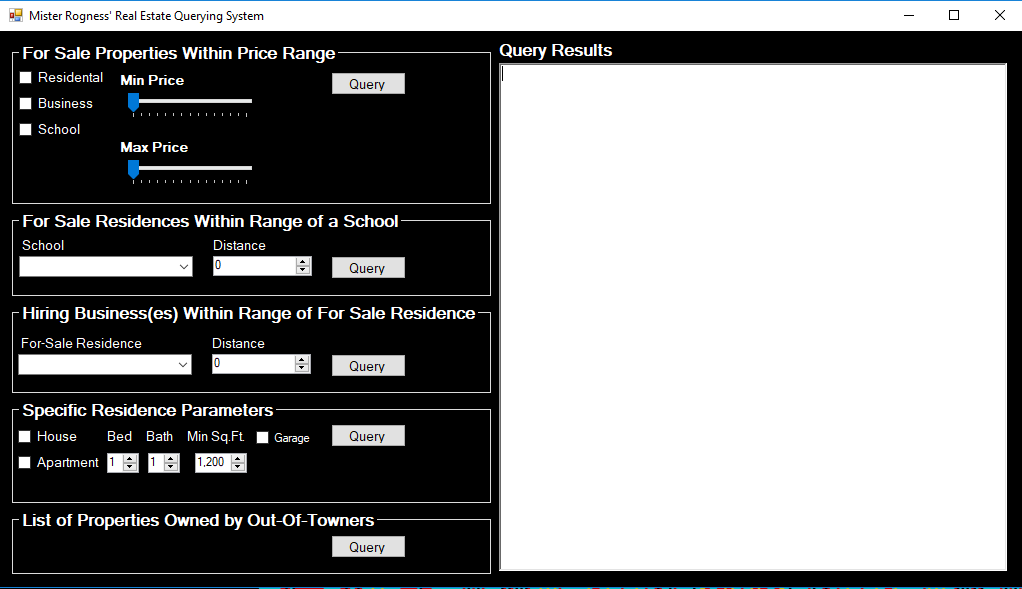
This can help provide some directions on how to implement this, as well as point out features of this that are
new from the Form we created in Assignment 2. As with the last assignment, too: you are not required to replicate
this design. In fact, I encourage all of you to tackle the design of the Form in whatever way you think makes the
most sense to you.
One thing you'll notice is that not a single input field allows for user-provided text input. This is our ideal
outcome when it comes to Forms, as these alternative modes of input
limit the amount of intentional or
accidental mistakes when it comes to input, as well as help protect against malicious Form usage.
Each of the
ComboBoxes need to be populated from your source code, with many of their
values derived from the input files accordingly. The
TrackBars used in Query 1 should
iterate from [0, 350000], with two additional requirements: toggling either
TrackBar
should display the current value of that
TrackBar's... Value, in the corresponding
Label. Additionally, scrolling the minimum value above the maximum should drag that one along, or conversing with
lowering the maximum value below the currently set minimum. This way, you never run into a situation where min >
max. It's fine if they are equal to each other, although not particularly useful as a query parameter. The
NumericUpDown component for Queries 2 and 3 should iterate from [0, 500], with an increment
set to 50; for Query 4, Bed/Bath should iterate from [0, 6], with an increment set to 1; Min. Sq.Ft. should iterate
from [1200, 6000], and increment by 250.
The utilization of distance between properties is finally where we'll make use of those (X, Y) coordinate values
we've been attaching to every property. For those who need a refresher on how to calculate distance between two
Cartestian coordinates, refer to
this Google search result. The observant reader might recognize the undefined relationship between properties
in DeKalb as compared to Sycamore, since they may both appear in query results. For this assignment, we're going
to assume that Sycamore properties are simply offset +250 in the X direction from DeKalb properties. For example,
the distance between (40, 40) in DeKalb and (40, 40) in Sycamore would be exactly 250.
Now, while I have no intention of walking you through the code necessary to achieve each of these objectives, some
of them are reached through... potentially less than obvious means. So here are some Development Strategies/General
Comments.
- For Sale Properties Within Price Range: This one is only difficult until you solve the
"did the user check residential? and/or business? and/or school?" problem. You do want to divide the output between
the two Community objects, which lends this implementation to utilizing the
groupby LINQ operator. And by "lends this implementation to", I really mean, "you are required to implement
it in this way". Order by price in ascending order.
- For Sale Residences Within Range of a School: This is probably the easiest of the bunch,
assuming you have the distance problem worked out correctly. Order by distance in descending order.
- Hiring Business(es) Within Range of a For Sale Property: This should be relatively easy to
put together after the previous two. Although you will need to get creative in order to include the Distance value
in the output report. Order by their active recruitment in descending order.
- Specific Residence Parameters: This is where I realized I wanted to ramp up the difficulty.
Specifically because I am requiring this problem be solved with a single (albeit lengthy) LINQ query. Formatting the
header for the output also includes some attention to detail as well, such as avoiding "with 2 bed". As it was
with Assignment 2, by selecting "Apartment", we should hide (and subsequently ignore) the garage input fields. Order
by price in ascending order.
- List of Properties Owned by Out-Of-Towners: once you include an extra method to
Communities, this becomes a relatively easy problem to solve.
It might be worth mentioning that I heavily relied on
SortedLists in my solutions, since
we have unique ID values associated with all properties and people. This does trivialize some of these problems.
Sample Output
While there's only one screenshot demonstrating an error message produced when there are no results, you should
absolutely have code in place to accommodate for missing input values or no results in each and every objective
to be achieved.
Drop-Down Menus:
Query 1:
Query 2:
Query 3:
Query 4:
Query 5:

